When submitting a PPCN you will need the AIAG PPCN Form.
- For reference see page 63 & 64 of AIAG’s Production Part Approval Process (PPAP) Fourth Edition
- NOTE: DTNA’s PPAP System only allows one attachment. Combine the PPCN form with any other
- documents planned for submission into one file.
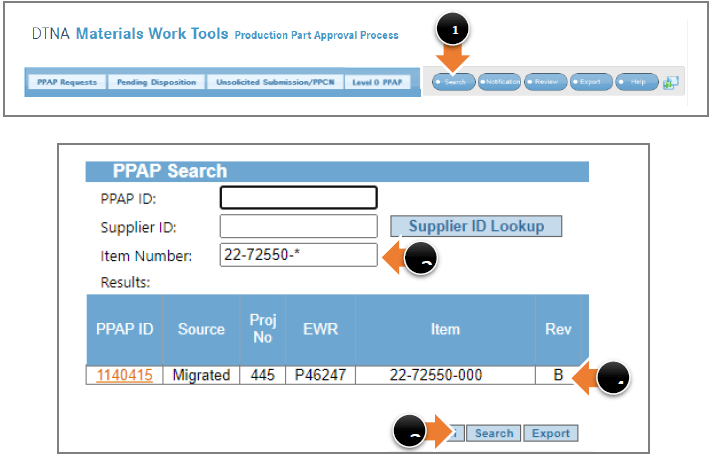
To look up the part:
- Select ‘Search’ from the action buttons.
- Enter a part number.
- Select ‘Search’ at the bottom of the search window.
- Find the revision level in the Rev column.
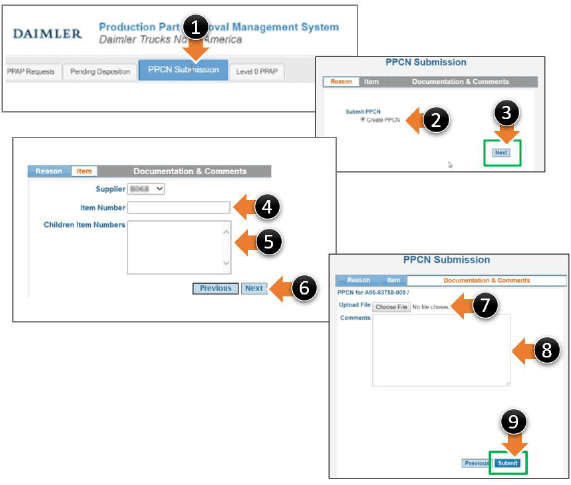
From within the PPAP System:
1.Select tab ‘PPCN Submission’
2.Select ‘Create PPCN’
3.Click ‘Next’
4.Enter item number from AIAG PPCN form
5.If additional part numbers are involved enter the part numbers in the ‘Children Item Numbers’ field
6.Click ‘Next’
7.Attach the AIAG PPCN Form
8.In comments add any comments
9.Click ‘Submit’
Complete the AIAG form (PPCN form from Production Part Approval Process (PPAP), AIAG, Fourth Edition, Page 64.
 Daimler Truck Supplier Training Academy