How to set up quality contacts
1.) Go to DTNA’s Supplier 360 site: https://dtna.my.site.com/Supplier
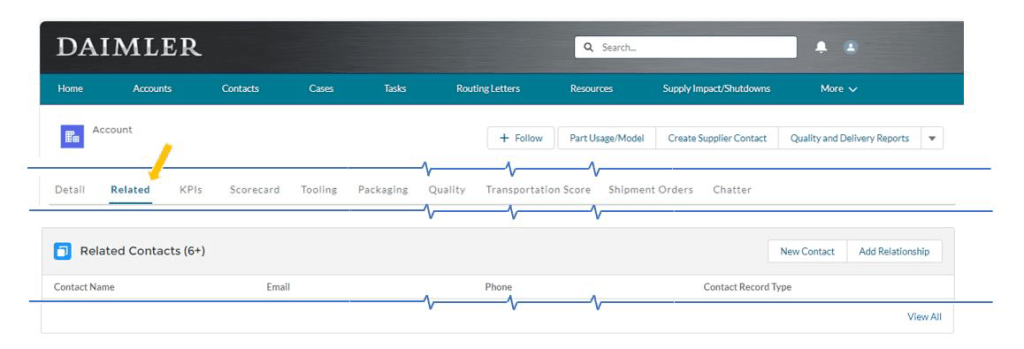
2.) Verify contact exists that will be assigned to quality notification. Verify this from the ‘Related’ tab.
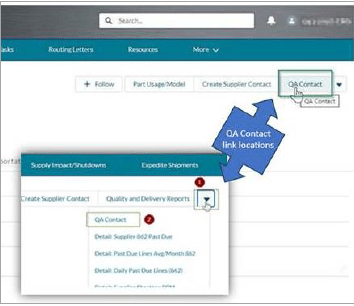
3.) Locate QA Contact from the menu options.
QA Contact will either appear on the menu bar or within the dropdown.
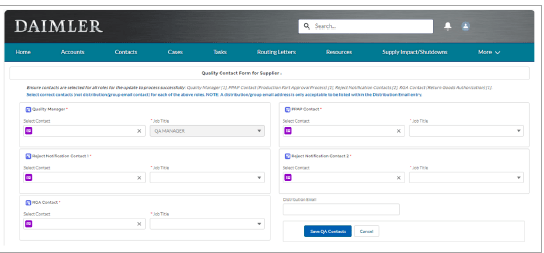
4.) Start typing a name in one of the fields and a list of matching names will appear for selection.
Select a Job Title
After completing all required fields select ‘Save QA Contacts’ and verify contacts saved successfully.
To remove a contact select the ‘X’ next to the contacts name. Only one person can be listed as the contact any old contact will need to be removed.
 Daimler Truck Supplier Training Academy